
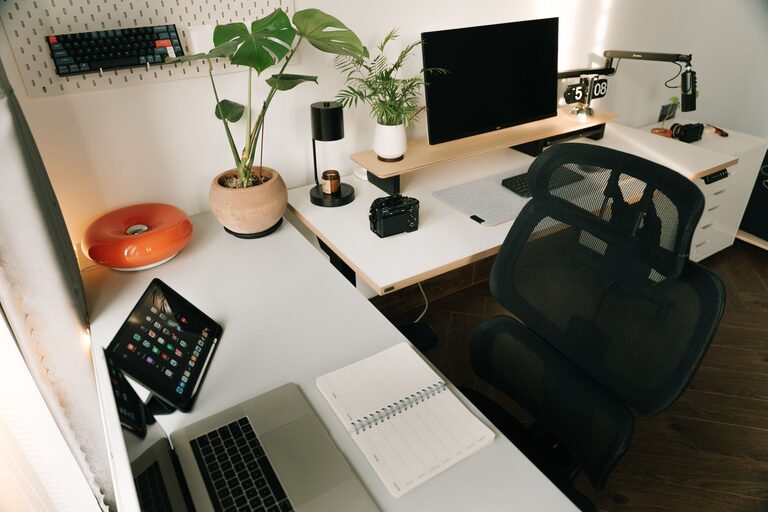
Creating a well-organized home workspace plays a crucial role in boosting productivity and ensuring comfort throughout your workday. Whether you are working remotely full-time or occasionally catching up on tasks from home, an organized space can make a significant difference in your focus and motivation. This post offers practical tips to help you design a workspace that supports your work habits while keeping you comfortable.
Why Organize Your Home Workspace?
A cluttered or poorly arranged workspace can cause distractions, stress, and inefficiency. By organizing your area thoughtfully, you help your brain associate the space with work and productivity, reducing procrastination and improving task completion. Comfort also contributes to better posture and less fatigue, enabling you to work longer without discomfort.
Assess Your Space and Needs
Before jumping into organization, take a moment to assess your space:
– Available area: Is it a dedicated room, a corner, or part of another room?
– Work activities: What tasks do you perform? Computer work, writing, drawing?
– Storage needs: What supplies, paperwork, or equipment do you use regularly?
– Lighting: What kind of natural or artificial light is available?
Understanding your specific needs guides you in creating a workspace tailored for maximum efficiency and comfort.
Choose the Right Furniture
Selecting appropriate furniture forms the foundation of an organized workspace.
Desk
– Pick a desk with enough surface area for your computer, notebook, and other tools.
– Consider desks with built-in storage like drawers or shelves to keep essential items handy.
Chair
– Choose an ergonomic chair that provides good back support and can adjust to your height.
– Sitting comfortably helps maintain good posture and reduces strain during long work sessions.
Storage Units
– Use filing cabinets, shelves, or storage bins to keep documents and supplies neatly arranged.
– Labeling storage containers makes it easier to find items quickly.
Organize Your Desk Layout
How you arrange items on your desk impacts your workflow and comfort.
– Keep frequently used items within arm’s reach — pens, notebooks, phone.
– Limit desk clutter by storing seldom-used items nearby but off the desktop.
– Use cable organizers or clips to manage cords and prevent tangling.
– Place a small plant or a photo for a personal touch without crowding the space.
Maximize Lighting for Productivity
Proper lighting reduces eye strain and keeps energy levels up.
– Position your desk near a window to take advantage of natural light.
– Use adjustable desk lamps to focus light on work areas during darker hours.
– Choose bulbs that offer bright but warm light to create a comfortable ambiance.
Maintain a Clean and Tidy Environment
Daily upkeep prevents clutter from building up and overwhelming your space.
– Set aside a few minutes at the end of the day to clear your desk and organize papers.
– Use trays or organizers to separate incoming and outgoing documents.
– Regularly dust and wipe down surfaces to keep your area inviting.
Personalize Thoughtfully
Having a workspace that feels inviting can boost mood and productivity.
– Add a few personal items like artwork, motivational quotes, or a calendar.
– Avoid over-decorating to keep distractions minimal.
Incorporate Break Spaces
If possible, create a small area to step away from your desk during breaks.
– A cozy chair or a standing area can encourage stretching and rest.
– Taking short breaks helps maintain focus over longer periods.
Utilize Technology Wisely
Technology can improve organization and workflow but requires management.
– Use digital tools for note-taking, project management, and scheduling.
– Keep your computer desktop organized with folders and limited icons.
– Set up notifications mindfully to minimize interruptions.
Ergonomics and Comfort Tips
Comfort is key to sustained productivity.
– Position your monitor at eye level to avoid neck strain.
– Keep your keyboard and mouse at a height that keeps wrists straight.
– Consider a footrest if your feet don’t comfortably reach the floor.
– Adjust room temperature and ventilation to ensure comfort.
Final Thoughts
Organizing your home workspace is a continuous process that adapts to your changing needs. By thoughtfully selecting furniture, arranging your desktop, optimizing lighting, and maintaining tidiness, you create an environment that encourages productivity and comfort. Remember, a workspace tailored to you makes working from home a more enjoyable and effective experience. Start small, make it your own, and watch your focus and comfort improve.